Apple granted patent for dual-sided trackpad
TweetFollow Us on Twitter

Apple granted patent for dual-sided trackpad

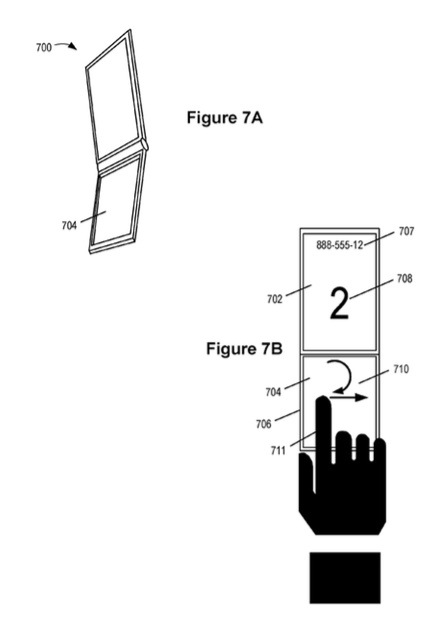
Apple has been granted a patent (number 20120235949) by the U.S. Patent & Trademark Office for a dual-sided trackpad.

A system including a capacitive array element capable of sensing touch from either side is described. A connected processor unit, either in the device or the host system, may be adapted to interpret signals from the capacitive array element as a cursor or view movement with six degrees of freedom.

The track pad device may include a display element and the capacitive array element may be translucent. The display element and the array element may be configured with respect to each other, where different configurations can be associated with different operating modes. For example, when the array element lies over the display screen so that the display screen is viewable through the array element, the array element can function as a touch screen. In another configuration, the array element may generate signals indicating a user's touch from one or the other or both sides of the array element.

Here's Apple's background on the invention: "Many devices used in day-to-day life for various and divergent functions are essentially computers, or computing devices. Such devices typically include a computer processor and computer memory coupled by a bus. Such devices include, but are not limited to, Personal Digital Assistants (PDAs), telephones, media players, cameras, and Global Positioning Satellite (GPS) modules as well as laptop computers and traditional desktop computers.

"Many of the above devices are configurable. For example, a laptop may have a main body with a screen unit rotationally attached to the host device. Thus, the user may configure the screen at a desirable angle for viewing. The user may also protect the screen by 'closing' the laptop, i.e., by rotating the screen unit against a keyboard portion of the host device where it is latched in that position. In another example, a cellular telephone may have an upper piece and a lower piece rotationally connected by a hinge as in a conventional "clam shell" design. The two pieces may be configured so that the two pieces are together ('closed') or apart ('open').

"In many of the above devices, the mode of use results in or requires a certain configuration. For example, the laptop must typically be open to see the screen and use the keyboard. The cellular telephone typically must be open for the user to speak into microphone and have access to the telephone's earpiece.

"Like most computers, these devices require an input tool and an output tool. Many types of input tools exist for performing operations in computers. Typical operations include moving a cursor and making selections on a display screen. Input tools may include a collection of keys or buttons, mice, trackballs, joysticks, touch pads, and touch screens.

"The input tool often varies according to the designed function of the computer, i.e., a computer designed to be used as a cellular telephone may have a specialized telephone keypad for that purpose, whereas a computer designed to be used as a laptop may have the standard 'QWERTY' keyboard with function keys and keys for screen navigation.

"Visual displays have become one of the most prevalent output tools. In mobile devices the visual display is typically a display screen, such as a Liquid Crystal Display (LCD) screen, which is built into the main housing of the device or moveably (but permanently) attached to the main housing of the device. As with input devices, the display screen may be specially configured according to the purpose of the computer.

"Both touch screens and touch pads have become increasingly popular input tools. Touch pads allow a user to make selections on a screen by making gestures on a touch pad with a finger or stylus. Touch screens allow a user to make selections on a screen by touching the display screen with a finger or a stylus. It is also possible for the user to make selections on the screen by making gestures, as with touch pads. Touch screens are therefore becoming more popular because of their ease of use and versatility of operation.

"Other input devices, however, may sometimes be preferred to touch screens, such as in cases where it is important not to block a user's view of the touch screen with a hand or stylus when using an input device. If display elements are small, or if display elements rapidly change, a keyboard or touch pad may be more desirable than a touch screen. For example, while typing a document it is often desirable to see all the typed characters and to see changes to the characters as they are typed.

"The desirability of a touch screen as an input tool for some tasks and another device, such as a touch pad, as an input tool for other tasks, has resulted in devices having redundant input tools. For example, some devices have both a touch screen and a keyboard. Other devices have both a touch screen and a touch pad. While such input devices make using the computer easier, the computer is more costly in terms of manufacturing and in terms of the space used on the computer for both input devices.

"In some circumstances, having more than one input device being active at one time may cause unexpected behavior. For example, in the case where a touch screen is above a touch pad on the device, a user attempting to utilize the touch screen using a finger may brush against the touch pad with an arm, creating unexpected input signals from the touch pad to the computer and causing unexpected and possibly disastrous results.

"It is therefore sometimes desirable to dedicate one input device for one task and another input device for another task by automatically deactivating the undesired input device and automatically activating the desired input device in dependence upon the device's mode of use.

"While it is advantageous in some circumstances to have only one input device activated at a time, it is advantageous in other circumstances for more than one input device to be simultaneously activated and to interpret or accept input from any of the devices according to the computer's mode of use.

"A computing device's mode of use may be designated by commands from the user. However, this requires the user to take proactive and time-consuming steps. Setting a configuration for interpretation or acceptance of input from any of the input devices may be complicated and difficult to understand. Additionally, the user may feel this use of time is inefficient and may decide not to designate the mode of use, or the user may also forget to designate the mode of use. Either case leaves the user in danger of unexpected input from the undesired input device.

"Thus, despite the availability of useful input tools, making the appropriate input tool available for the user remains a problem. It is therefore a goal of this invention to solve or at least reduce the problems associated with input tools on computing devices."

Chris A. Ligtenberg is the inventor.

 
AAPL
$445.15
Apple Inc.
+3.01
MSFT
$34.27
Microsoft Corpora
+0.12
GOOG
$873.32
Google Inc.
-9.47

MacTech Search:
Community Search:

Software Updates via MacUpdate

Evernote 5.1.1 - Create searchable notes...
Evernote allows you to easily capture information in any environment using whatever device or platform you find most convenient, and makes this information accessible and searchable at anytime, from... Read more
SketchUp 13.0.3688 - Create 3D design co...
SketchUp is an easy-to-learn 3D modeling program that enables you to explore the world in 3D. With just a few simple tools, you can create 3D models of houses, sheds, decks, home additions,... Read more
Flavours 1.0.8 - Create and apply themes...
Flavours allows users to create, apply, and share beautifully designed themes. Classy - Give your Mac a gorgeous new look by applying delicious themes! Easy - Unleash your creativity and make your... Read more
GarageSale 6.6b10 - Create outstanding e...
GarageSale is a slick, full-featured client application for the eBay online auction system. Create and manage your auctions with ease With GarageSale, you can create, edit, track, and manage... Read more
Twitter 2.2.1 - Official Twitter client...
Twitter (was Tweetie) is a Twitter client with a variety of features. Important Note: As of January 2011, AteBit's Tweetie application has been acquired and renamed by Twitter. Version 1.2.8 of the... Read more
SteerMouse 4.1.6 - Powerful third-party...
SteerMouse is an advanced driver for USB and Bluetooth mice. It also supports Apple Mighty Mouse very well. SteerMouse can assign various functions to buttons that Apple's software does not allow,... Read more
Google Chrome 27.0.1453.93 - Modern and...
Google Chrome is a Web browser by Google, created to be a modern platform for Web pages and applications. It utilizes very fast loading of Web pages and has a V8 engine, which is a custom built... Read more
Labels & Addresses 1.6.5 - Powerful...
Labels & Addresses is a home and office tool for printing all sorts of labels, envelopes, inventory labels, and price tags. Merge-printing capability makes the program a great tool for holiday... Read more
Delicious Library 3.0.2 - Import, browse...
Delicious Library allows you to import, browse, and share all your books, movies, music, and video games with Delicious Library. Run your very own library from your home or office using our... Read more
KeyCue 6.5 - Displays all menu shortcut...
KeyCue helps you to use your OS X applications more effectively. Just hold down the Command key for a while - KeyCue comes to help and shows a table of all currently available keyboard shortcuts.... Read more

Kite Surfer Review
Kite Surfer Review By Rob Rich on May 24th, 2013 Our Rating: :: MAKE SOME WAVESUniversal App - Designed for iPhone and iPad Kite Surfer looks good and controls great, although it’s also a little light on content.   | Read more »
Spottlife Review
Spottlife Review By Lee Hamlet on May 24th, 2013 Our Rating: :: CATEGORIZE YOUR SOCIAL LIFEiPhone App - Designed for the iPhone, compatible with the iPad Spottlife is a new way to view and interact with the world’s most popular... | Read more »
Plasma Pig Review
Plasma Pig Review By Jordan Minor on May 24th, 2013 Our Rating: :: THAT'LL DO, PIGUniversal App - Designed for iPhone and iPad This porky pig needs a light touch.   | Read more »
Hipstamatic Oggl Review
Hipstamatic Oggl Review By Chris Kirby on May 24th, 2013 Our Rating: :: HIP YET AGAIN Remember Hipstamatic? It’s back with a host of features to challenge the likes of Instagram.   Developer: Hipstamatic Price: Free Version... | Read more »
How I Used RadarScope To Track The Oklah...
It could have easily happened that my life would have taken me down the road of becoming a meteorologist. However, that didn’t happen and I found myself becoming a journalist instead. My passion for weather is still present and I have a good... | Read more »
Tetris Blitz Review
Tetris Blitz Review By Carter Dotson on May 24th, 2013 Our Rating: :: TREPAK BLITZUniversal App - Designed for iPhone and iPad There’s fun to be had in short bursts with Tetris Blitz, but it just feels way too engineered to be fun... | Read more »
Dumb Ways to Die Lets You Save Cute Litt...
Dumb Ways to Die Lets You Save Cute Little Creatures…Maybe Posted by Andrew Stevens on May 24th, 2013 [ permalink ] Universal App - Designed for iPhone and iPad | Read more »
Nikko RC Racer Review
Nikko RC Racer Review By Jennifer Allen on May 24th, 2013 Our Rating: :: STRAIGHTFORWARD RACINGUniversal App - Designed for iPhone and iPad Fun for five minutes, Nikko RC Racer lacks some serious staying power, feeling all too... | Read more »
Delifishes Review
Delifishes Review By Lee Hamlet on May 24th, 2013 Our Rating: :: YOU JELLY?Universal App - Designed for iPhone and iPad Playing Delifishes brings back memories of the first generation of mobile games, which is by no means a bad... | Read more »
4 Kingdoms Review
4 Kingdoms Review By Campbell Bird on May 24th, 2013 Our Rating: :: YET ANOTHER KINGDOM GAMEiPad Only App - Designed for the iPad 4 Kingdoms offers familiar menu-based, freemium management gameplay with a fresh coat of cosmetic... | Read more »

Price Scanner via MacPrices.net

Apple drops prices on refurbished iPads and iPad m...
 Apple today dropped prices on Apple Certified Refurbished iPad 4s and iPad minis with some models now available for up to $140 off the cost of new models. Apple’s one-year warranty is included with... Read more
Should You Upgrade To OS X 10.8 Mountain Lion This...
If you haven’t upgraded to OS X 10.8 Mountain Lion by now, there’s probably a case to be made for just holding out with whatever earlier version you’re using until we see what Apple brings forth with... Read more
Apple Tops Gartner Supply Chain Top 25 Rankings Fo...
Gartner, Inc. has released the findings from its ninth annual Supply Chain Top 25. The goal of the Supply Chain Top 25 research initiative is to raise awareness of the supply chain discipline and how... Read more
7-inch Tablets: What User Experience Benchmarks Sh...
A new Tablet User Experience Research survey by Pfeiffer Consulting indicates that user experience with tablets and smartphones is one of the most important aspects of the overall perceived value of... Read more
PayPal Global Study Spells Doom for the Wallet – C...
PayPal has revealed the findings of a global study that paints a dim future for the wallet. A vast majority (83%) of respondents across five countries indicated they wished they didnt have to carry a... Read more
How to Set Up Your Mac to Allow AirPrinting From i...
mac.tutsplus.com’s Jordan Merrick says: AirPrint is a great feature of iOS that provides a simple way of printing documents from your iPhone or iPad directly to an AirPrint-compatible printer with no... Read more
Price drop on refurbished 15″ 2.3GHz MacBook Pro,...
 The Apple Store has lowered their price on Apple Certified Refurbished 15″ 2.3GHz MacBook Pros to $1449 or $350 off the cost of new models, including free shipping. Apple’s one-year warranty is... Read more
Memorial Day Weekend iMac sale: $150 off MSRP
 Best Buy has iMacs on sale for $150 off MSRP on their online store for Memorial Day Weekend. Choose free home shipping or free instant local store pickup (if available): - 27″ 3.2GHz iMac: $1849.99... Read more
Economic Conservatives Defend Apple’s Tax Strategy
Given Apple’s longtime reputation as the particular darling of the liberal lefty end of the spectrum, it’s been facinating to see mostly prominant conservatives rallying to the defense of Apple’s... Read more
Is Apple Losing Its “Cool” Cachet With The Popular...
SMH’s Steve Colquhoun notes that while Apple has again been rated as the world’s top brand this week, a leading social researcher warns the company and its products are losing touch with Generation Y... Read more

Jobs Board

*Apple* Retail - Manager - Apple Inc. (...
Job Summary Keeping an Apple Store thriving requires a diverse set of leadership skills, and as a Manager, you’re a master of them all. In the store’s fast-paced, Read more
*Apple* Account Executive - CompuCom (U...
Apple Account Executive Job Location US-IL-Des Plaines Posted Date 3/27/2013 Req # 2013-4905 Apply/Socialize: * Apply Now! * Email this opportunity to a friend or Read more
*Apple* - Solution Architect - CompuCom...
Apple - Solution Architect Job Location US-TX-Dallas Posted Date 4/18/2013 Req # 2013-4932 Apply/Socialize: * Apply Now! * Email this opportunity to a friend or Read more
Mac/ *Apple* Specialist Needed - Enterp...
Mac/ Apple Specialist Needed - Enterprise iPad Deployment A prominent Robert Half client is seeking out a Mac/ Apple Specialist to assist with an iPad deployment Read more
Mac/ *Apple* Specialist Needed | Enterp...
Mac/ Apple Specialist Needed | Enterprise iPad Deployment A prominent Robert Half client is seeking out a Mac/ Apple Specialist to assist with an iPad deployment Read more
All contents are Copyright 1984-2011 by Xplain Corporation. All rights reserved. Theme designed by Icreon.