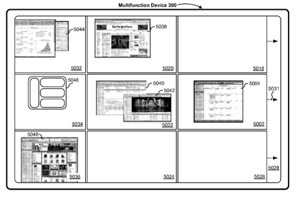
An Apple patent (number 20110078624) for a device method and graphical user interface for manipulating workspace views has appeared at the US Patent & Trademark Office. It indicates that Apple is thinking of bring the Spaces feature of Mac OS X to the iPad. Actually, the patent could also mean Spaces for the iPhone and iPod touch, but, with their smaller screens, that doesn’t seem practical.
On Mac OS X, Spaces lets you group application windows together according to the way you work and easily switch between them. You can organize each space just the way you want it.
Per the patent, in some embodiments, a multifunction device with a display and a touch-sensitive surface creates a plurality of workspace views. A respective workspace view is configured to contain content assigned by a user to the respective workspace view. The content includes application windows.
The device displays a first workspace view in the plurality of workspace views on the display without displaying other workspace views in the plurality of workspace views and detects a first multifinger gesture on the touch-sensitive surface. In response to detecting the first multifinger gesture on the touch-sensitive surface, the device replaces display of the first workspace view with concurrent display of the plurality of workspace views. The inventors of the patent are Julian Missing, Jonathan Koch, Avi E. Cleplinski, Michael B. Victor, Jeffrey Traer Bernstein, Duncan R. Kerr and Myra M. Haggerty.
Here’s Apple’s background and summary of the invention: “The disclosed embodiments relate generally to workspace views in electronic devices with touch-sensitive surfaces. More particularly, the disclosed embodiments relate to manipulating workspace views on such devices, such as moving between workspace views, moving a window between two workspace views, and displaying multiple workspace views.
“The use of touch-sensitive surfaces as input devices for computers and other electronic computing devices has increased significantly in recent years. Exemplary touch-sensitive surfaces include touch pads and touch screen displays. Such surfaces are widely used to manipulate virtual objects in user interfaces for multifunction devices.
“While using an operating system or other application with a plurality of open applications and/or application windows, a user may need to move from one workspace view (i.e., a first ‘virtual desktop’) to a different workspace view (i.e., a second ‘virtual desktop’), move one or more windows from a first workspace view to another workspace view, or see several workspace views simultaneously. Exemplary operating system user interfaces in which multiple workspace views can or could be implemented include the user interfaces for the OS X, Darwin, RTXC, Linux, Unix and Windows operating systems.
“But existing methods for performing these manipulations of workspace views are cumbersome and inefficient. For example, moving between one workspace view and another workspace view may require selecting an icon or other small graphical user interface object with a cursor, and/or remembering unintuitive keyboard shortcuts or other navigation commands. Such manipulations are tedious and create a significant cognitive burden on a user. In addition, existing methods take longer than necessary, thereby wasting energy. This latter consideration is particularly important in battery-operated devices.
“Accordingly, there is a need for electronic devices with faster, more efficient methods and interfaces for manipulating workspace views. Such methods and interfaces may complement or replace existing methods for manipulating workspace views. Such methods and interfaces reduce the cognitive burden on a user and produce a more efficient human-machine interface. For battery-operated electronic devices, such methods and interfaces conserve power and increase the time between battery charges.
“The above deficiencies and other problems associated with user interfaces for electronic devices with touch-sensitive surfaces are reduced or eliminated by the disclosed devices. In some embodiments, the device is a desktop computer. In some embodiments, the device is portable (e.g., a notebook computer, a tablet, or a handheld device). In some embodiments, the device has a touchpad. In some embodiments, the device has a touch-sensitive display (also known as a ‘touch screen’ or ‘touch screen display’).
“In some embodiments, the device has a graphical user interface (GUI), one or more processors, memory and one or more modules, programs or sets of instructions stored in the memory for performing multiple functions. In some embodiments, the user interacts with the GUI primarily through finger contacts and gestures on the touch-sensitive surface. In some embodiments, in addition to manipulating workspace views, the functions include one or more of: image editing, drawing, presenting, word processing, website creating, disk authoring, spreadsheet making, game playing, telephoning, video conferencing, e-mailing, instant messaging, workout support, digital photographing, digital videoing, web browsing, digital music playing and/or digital video playing. Executable instructions for performing these functions may be included in a computer readable storage medium or other computer program product configured for execution by one or more processors.
“In accordance with some embodiments, a computer-implemented method is performed at a multifunction device with a display and a touch-sensitive surface. The method includes creating a plurality of workspace views. A respective workspace view is configured to contain content assigned by a user to the respective workspace view. The content includes application windows. The method further includes displaying a first workspace view in the plurality of workspace views on the display, without displaying other workspace views in the plurality of workspace views.
“The method also includes detecting a first multifinger gesture on the touch-sensitive surface. In response to detecting the first multifinger gesture on the touch-sensitive surface, the method includes replacing display of the first workspace view with concurrent display of the plurality of workspace views.
“In accordance with some embodiments, a graphical user interface on a multifunction device with a display and a touch-sensitive surface includes a plurality of workspace views. The respective workspace view is configured to contain content assigned by a user to the respective workspace view. The content includes application windows. A first workspace view in the plurality of workspace views on the display is displayed without displaying other workspace views in the plurality of workspace views.
“A first multifinger gesture is detected on the touch-sensitive surface. In response to detecting the first multifinger gesture on the touch-sensitive surface, display of the first workspace view is replaced with concurrent display of the plurality of workspace views.
“In accordance with some embodiments, a multifunction device, comprises: a display; a touch-sensitive surface; one or more processors; memory; and one or more programs. The one or more programs are stored in the memory and configured to be executed by the one or more processors. The one or more programs include instructions for creating a plurality of workspace views. A respective workspace view is configured to contain content assigned by a user to the respective workspace view. The content includes application windows. The one or more programs also include instructions for displaying a first workspace view in the plurality of workspace views on the display, without displaying other workspace views in the plurality of workspace views; instructions for detecting a first multifinger gesture on the touch-sensitive surface. In response to detection of the first multifinger gesture on the touch-sensitive surface the device includes instructions to replace display of the first workspace view with concurrent display of the plurality of workspace views.
“In accordance with some embodiments, a computer readable storage medium stores one or more programs, the one or more programs comprise instructions which, when executed by a multifunction device with a display and a touch-sensitive surface, cause the device to create a plurality of workspace views. A respective workspace view is configured to contain content assigned by a user to the respective workspace view. The content includes application windows.
“The programs also include instructions which, when executed by the multifunction device, cause the device to: display a first workspace view in the plurality of workspace views on the display, without displaying other workspace views in the plurality of workspace views; detect a first multifinger gesture on the touch-sensitive surface; and, in response to detection of the first multifinger gesture on the touch-sensitive surface instructions, replace display of the first workspace view with concurrent display of the plurality of workspace views.
“In accordance with some embodiments, a multifunction device, comprises: a display; a touch-sensitive surface; means for creating a plurality of workspace views. A respective workspace view is configured to contain content assigned by a user to the respective workspace view. The content includes application windows. The device also comprises means for displaying a first workspace view in the plurality of workspace views on the display, without displaying other workspace views in the plurality of workspace views; means for detecting a first multifinger gesture on the touch-sensitive surface; and means, responsive to detection of the first multifinger gesture on the touch-sensitive surface, for replacing display of the first workspace view with concurrent display of the plurality of workspace views.
“In accordance with some embodiments, an information processing apparatus for use in a multifunction device with a display and a touch-sensitive surface, comprises: means for creating a plurality of workspace views. A respective workspace view is configured to contain content assigned by a user to the respective workspace view. The content includes application windows.
“The information processing apparatus also comprises means for displaying a first workspace view in the plurality of workspace views on the display, without displaying other workspace views in the plurality of workspace views; means for detecting a first multifinger gesture on the touch-sensitive surface; and means, responsive to detection of the first multifinger gesture on the touch-sensitive surface, for replacing display of the first workspace view with concurrent display of the plurality of workspace views.
“Thus, electronic devices with touch-sensitive surfaces are provided with faster, more efficient methods and interfaces for manipulating workspace views, thereby increasing the effectiveness, efficiency, and user satisfaction with such devices. Such methods and interfaces may complement or replace existing methods for manipulating workspace views.”
Along the same lines Apple patents for a device, method and graphical user interface for displaying emphasis animations for an electronic device in a presentation mode (patent number 20110078560) and device, method and graphical user interface for moving a calendar entry in a calendar application for an electronic device in a presentation mode (patent number 20110078622). The involve, respectively, Keynote and iCal for the iPad.
— Dennis Sellers