Type of Article: MacTech Web Site

Kool Tools: CaseCrown SlimPower Wallet

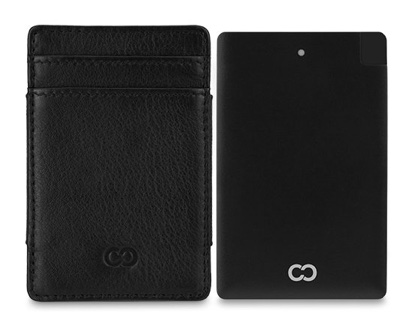
CaseCrown’s SlimPower Wallet is more than a simple wallet. It can charge your smartphone on the go using an ultra-thin power bank that’s securely packed in the middle.

The SlimPower Wallet is so slim and lightweight that it fits in the palm of your hand. An angled Micro USB cable and hidden Lightning Adapter is smartly integrated into the power bank, so the wallet is compatible with both iPhones and Android phones.

The wallet itself includes three card slots and an elastic band to hold bills or additional cards. There’ss also RFID blocking capability within the wallet.

Read More

ChronoSync for macOS revved to version 4.7.3

Econ Technologies (www.econtechnologies.com) has released ChronoSync 4.7.3 for macOS with several new features and fixes. It’s a sync, backup, and bootable back-up app.

ChronoSync can back up and sync to anything you can connect to a Mac: external drives, thumb drives, NAS drives, remote Macs, PC’s and cloud services. Version 4.7.3 includes several fixes, in addition to the enhancements implemented in ChronoSync 4.7.3.

ChronoSync works with macOS 10.8 and higher. A demo is available for download; registration is $49.99.

Read More

iPhone, Services, Mac, Apple Watch set all-time records

Apple has announced the financial results for its fiscal 2017 first quarter that ended Dec. 31, 2016. The company posted all-time record quarterly revenue of $78.4 billion and all-time record quarterly earnings per diluted share of $3.36. These results compare to revenue of $75.9 billion and earnings per diluted share of $3.28 in the year-ago quarter. International sales accounted for 64 percent of the quarter’s revenue.

Read More

Twelve South releases the MagicBridge for Mac owners

Twelve South (www.twelvesouth.com) has released the $34.99 MagicBridge. Much like its predecessor, the MagicWand, the MagicBridge connects your Apple Wireless Keyboard and your Magic Trackpad 2, creating a one-piece control surface.

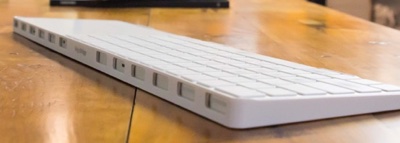
It allows you to place your trackpad on either the left or right side of your wireless keyboard, while sculpted edges hold your devices in place without interfering with touch typing or swiping. The detailed design doesn’t stop there. A grill on the back provides complete access to charging ports and power — in either the left or right configuration.

Read More