Unlike previous versions of macOS, macOS Tahoe allows you to change the font of your Mac’s Clock screen. Here’s how:
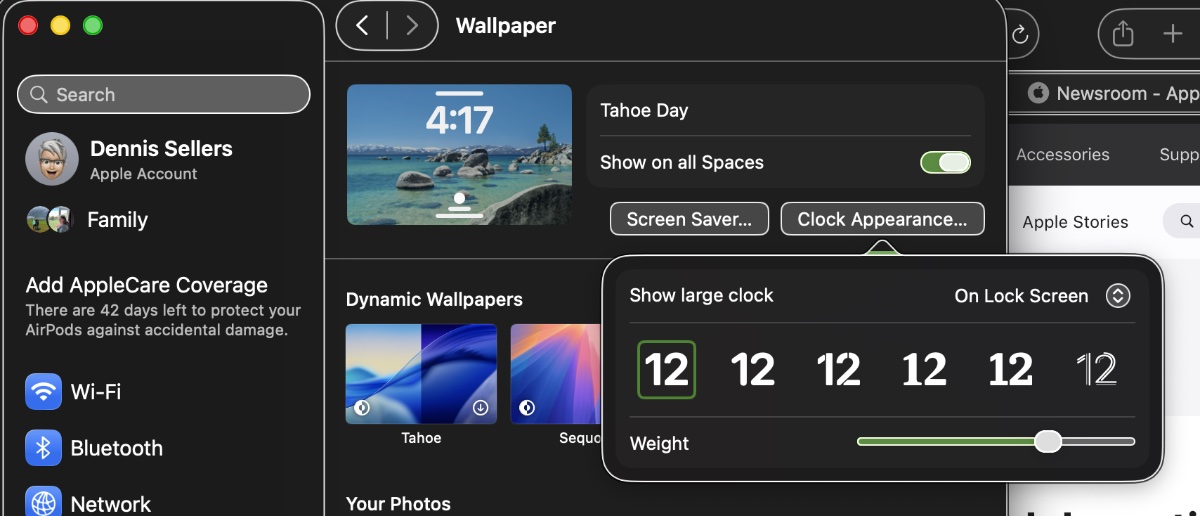
- Open System Settings (you can find it in the Apple menu or the Dock).
- In the left-hand sidebar, click on Wallpaper.
- Look for the Clock Appearance option at the top right and click it.
- Here, you’ll find options to select your desired font style from six choices and use a slider to adjust its weight or thickness.
- You can also choose whether the clock appears on the Lock Screen, both the Lock Screen and Screen Saver, or never.
The changes will be applied instantly, so you can then lock your screen to see the new font.
I hope you’ll help support Apple World Today by becoming a patron. All our income is from Patreon support and sponsored posts. Patreon pricing ranges from $2 to $10 a month. Thanks in advance for your support.
Article provided with permission from AppleWorld.Today