
iPad review, part two: Safari, Mail, Calendar and Contacts on the iPad
TweetFollow Us on Twitter

iPad review, part two: Safari, Mail, Calendar and Contacts on the iPad

Yesterday we looked at the iPad, its design and how well it works for music, movies and gaming. Today let's talk about how effective it is at handling web browsing, mail, calendar and contact info. The synopsis: pretty darn well.

First, web browsing. Safari simply flies on the iPad. I've never had a browsing experience where pages loaded this zippily. Anandtech (http://www.anandtech.com/show/3633/apples-a4-soc-faster-than-snapdragon) ran some benchmarking tests in this regard and discovered that the iPad runs much faster in rendering web pages than either the iPhone 3GS or Google Nexus One. Loading Engadget's web site was 59.4% faster on the iPad than on the Nexus One. Its benchmarked Javascript performance outdid the iPhone's by a big margin, and the Google smartphone by 37.6%.

What's more, pages look great on the 9.7-inch screen. Unless they use Flash. Like the iPhone and iPod touch, the iPad doesn't support the Adobe technology. Since Apple's head honcho, Steve Jobs, HATES Flash that's not likely to change.

Maybe I'm just lucky, but most of the sites I visit aren't dependent on Flash. Plus, Apple has convinced sites such as "The New York Times," "USA Today" and "CNN" (among others) to create iPad-friendly (ie, no Flash) versions of their web sites. You can find a list at http://www.apple.com/ipad/ready-for-ipad/ .

However, many sites are still Flash intensive. If your favorite web pages are among them, Safari on the iPad will be a problem. Also, due to the lack of a file explorer, you can't upload a photo, video, PDF or other document from within the browser.

That aside, using Safari on the iPad is, well, just plain fun. You can view whole web pages in portrait or landscape on the large Multi-Touch screen. Rotate the iPad to landscape and the page you’re viewing rotates, too, then expands to fit the display.

As with the iPhone and iPod touch, and with a tip of the hat to the Yellow Pages commercials of yesterday, you can let your fingers do the walking. You can scroll through a page by flicking up or down on the screen. Double-tap a section on a page to enlarge or shrink it. Or pinch to zoom in or out. When you touch and hold a link, Safari shows you the URL so you know before you go whether it's a site you really want to visit. You're also offered a handy thumbnail view that shows all your open pages in a grid, which makes it easy to move from one page to the next.

You can sync your bookmarks from your Mac and to your Mac. Safari on the iPad offers a convenient bookmark view. Google and Yahoo! searching is built in; Google is the default search engine, but you can set it to Yahoo!, if you wish. When you want to enter a URL or fill out a form, an onscreen keyboard appears (more on that in a moment). If you check the same web sites every day, you can create icons on the Home screen that let you access them with a single tap.

The iPad's native e-mail program is more of a mixed bag. It's easy to set up with Exchange, POP3, and IMAP4 e-mail accounts. You can sync email with your Mac. And Mail on the iPad takes advantage of the device's bigger screen.

Hold the iPad in landscape and you can see both an opened email and the messages in your inbox, each with a two-line preview of its contents. If you want to focus on a single email message, go from landscape to portrait mode, and the email message automatically rotates to fill the screen.

When you’re ready to compose a new message, a single tap reveals a virtual keyboard with keys that are almost the same size as a notebook’s. Because it’s software based, the iPad keyboard switches between landscape and portrait orientation with a turn. However, there's no tactile feedback from the onscreen keys, so I have trouble using the keyboard as naturally as I would a physical keyboard. You can use a Bluetooth keyboard or Apple's Keyboard Dock for the iPad, but that makes it a bit more awkward doing any serious emailing while, say, sitting on the bed.

As far as email appearance goes, like everything else on the iPad, it's gorgeous. The device displays rich HTML email, with images and photos appearing alongside text. When you receive an email attachment, you don’t have to save it and open it with another app. You can just tap it and view it. The iPad works with most standard file and image formats, so you can rotate, zoom, and pan your PDFs, iWork files, and Microsoft Word, Excel, and PowerPoint files. Another nice touch: you can save pictures to the iPad photo library with a tap.

On the other hand, attaching documents to an email is counter-intuitive. Files have to be attached to e-mails from the program used to create 'em.

Mail on iPad Mail can also convert web URLs, phone numbers, email addresses, and street addresses to links. Tap one and iPad automatically opens the app you need -- Safari, Contacts, Maps, etc. If you’re writing an email and you need to open another app to check a phone number or map an address, Mail remembers where you left off. Of course, if the iPad supported more multitasking, that wouldn't be necessary.

My biggest grip with Mail on the iPad is that there's no integrated e-mail inbox that collects e-mails from all your accounts filtering into one master inbox as happens on the Mac. If you have five different accounts like me, you'll have to exit and re-enter each account. Very inconvenient.

When it comes to Calendar and Contacts on the iPad, I have no complaints. Both look gorgeous and sync up just find with their counterparts on my iMac.

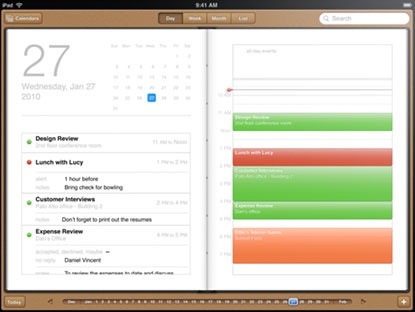
With Calendar, you can view your calendar by day, week, or month. The iPad changes views with a tap or a turn. In portrait view, you can see an entire month or the details of a single day. Rotate the Apple device to landscape, and you’ll find a list of the day’s activities on one side and your detailed schedule on the other.

You can create calendars for different schedules. Tap the plus sign to add an event, then assign the event to a calendar. Each calendar appears in a different color, so it’s easy to manage them all. And you can see all your calendars at once.

Ditto for Contacts on the iPad. You can sync wirelessly, via a USB connection or via MobileMe.

You can scroll through Contacts with a flick of your finger. You can use the built-in search. And you can group contacts. Turn the iPad to landscape, and you can view your entire contacts list and a single contact simultaneously. Another nice touch: tap an address inside a contact and iPad automatically opens Maps.

By the way, I've had no problems with getting my iPad to join or rejoin an Wi-Fi network, but some folks evidently have. Apple has posted a KnowledgeBase article on the matter. You can find it here: http://support.apple.com/kb/TS3304 .

Tomorrow: photos and ebooks on the iPad.

 
AAPL
$501.11
Apple Inc.
+0.00
MSFT
$34.64
Microsoft Corpora
+0.00
GOOG
$898.03
Google Inc.
+0.00

MacTech Search:
Community Search:

Software Updates via MacUpdate

CrossOver 12.5.1 - Run Windows apps on y...
CrossOver can get your Windows productivity applications and PC games up and running on your Mac quickly and easily. CrossOver runs the Windows software that you need on Mac at home, in the office,... Read more
Paperless 2.3.1 - Digital documents mana...
Paperless is a digital documents manager. Remember when everyone talked about how we would soon be a paperless society? Now it seems like we use paper more than ever. Let's face it - we need and we... Read more
Apple HP Printer Drivers 2.16.1 - For OS...
Apple HP Printer Drivers includes the latest HP printing and scanning software for Mac OS X 10.6, 10.7 and 10.8. For information about supported printer models, see this page.Version 2.16.1: This... Read more
Yep 3.5.1 - Organize and manage all your...
Yep is a document organization and management tool. Like iTunes for music or iPhoto for photos, Yep lets you search and view your documents in a comfortable interface, while offering the ability to... Read more
Apple Canon Laser Printer Drivers 2.11 -...
Apple Canon Laser Printer Drivers is the latest Canon Laser printing and scanning software for Mac OS X 10.6, 10.7 and 10.8. For information about supported printer models, see this page.Version 2.11... Read more
Apple Java for Mac OS X 10.6 Update 17 -...
Apple Java for Mac OS X 10.6 delivers improved security, reliability, and compatibility by updating Java SE 6.Version Update 17: Java for Mac OS X 10.6 Update 17 delivers improved security,... Read more
Arq 3.3 - Online backup (requires Amazon...
Arq is online backup for the Mac using Amazon S3 and Amazon Glacier. It backs-up and faithfully restores all the special metadata of Mac files that other products don't, including resource forks,... Read more
Apple Java 2013-005 - For OS X 10.7 and...
Apple Java for OS X 2013-005 delivers improved security, reliability, and compatibility by updating Java SE 6 to 1.6.0_65. On systems that have not already installed Java for OS X 2012-006, this... Read more
DEVONthink Pro 2.7 - Knowledge base, inf...
Save 10% with our exclusive coupon code: MACUPDATE10 DEVONthink Pro is your essential assistant for today's world, where almost everything is digital. From shopping receipts to important research... Read more
VirtualBox 4.3.0 - x86 virtualization so...
VirtualBox is a family of powerful x86 virtualization products for enterprise as well as home use. Not only is VirtualBox an extremely feature rich, high performance product for enterprise customers... Read more

Briquid Gets Updated with New Undo Butto...
Briquid Gets Updated with New Undo Button, Achievements, and Leaderboards, on Sale for $0.99 Posted by Andrew Stevens on October 16th, 2013 [ | Read more »
Halloween – iLovecraft Brings Frightenin...
Halloween – iLovecraft Brings Frightening Stories From Author H.P. | Read more »
The Blockheads Creator David Frampton Gi...
The Blockheads Creator David Frampton Gives a Postmortem on the Creation Process of the Game Posted by Andrew Stevens on October 16th, 2013 [ permalink ] Hey, a | Read more »
Sorcery! Enhances the Gameplay in Latest...
Sorcery! | Read more »
It Came From Australia: Tiny Death Star
NimbleBit and Disney have teamed up to make Star Wars: Tiny Death Star, a Star Wars take on Tiny Tower. Right now, the game is in testing in Australia (you will never find a more wretched hive of scum and villainy) but we were able to sneak past... | Read more »
FIST OF AWESOME Review
FIST OF AWESOME Review By Rob Rich on October 16th, 2013 Our Rating: :: TALK TO THE FISTUniversal App - Designed for iPhone and iPad A totalitarian society of bears is only the tip of the iceberg in this throwback brawler.   | Read more »
PROVERBidioms Paints English Sayings in...
PROVERBidioms Paints English Sayings in a Picture for Users to Find Posted by Andrew Stevens on October 16th, 2013 [ permalink ] | Read more »
OmniFocus 2 for iPhone Review
OmniFocus 2 for iPhone Review By Carter Dotson on October 16th, 2013 Our Rating: :: OMNIPOTENTiPhone App - Designed for the iPhone, compatible with the iPad OmniFocus 2 for iPhone is a task management app for people who absolutely... | Read more »
Ingress – Google’s Augmented-Reality Gam...
Ingress – Google’s Augmented-Reality Game to Make its Way to iOS Next Year Posted by Andrew Stevens on October 16th, 2013 [ permalink ] | Read more »
CSR Classics is Full of Ridiculously Pre...
CSR Classics is Full of Ridiculously Pretty Classic Automobiles Posted by Rob Rich on October 16th, 2013 [ permalink ] | Read more »

Price Scanner via MacPrices.net

Apple Store Canada offers refurbished 11-inch...
 The Apple Store Canada has Apple Certified Refurbished 2013 11″ MacBook Airs available starting at CDN$ 849. Save up to $180 off the cost of new models. An Apple one-year warranty is included with... Read more
Updated MacBook Price Trackers
We’ve updated our MacBook Price Trackers with the latest information on prices, bundles, and availability on MacBook Airs, MacBook Pros, and the MacBook Pros with Retina Displays from Apple’s... Read more
13-inch Retina MacBook Pros on sale for up to...
B&H Photo has the 13″ 2.5GHz Retina MacBook Pro on sale for $1399 including free shipping. Their price is $100 off MSRP. They have the 13″ 2.6GHz Retina MacBook Pro on sale for $1580 which is $... Read more
AppleCare Protection Plans on sale for up to...
B&H Photo has 3-Year AppleCare Warranties on sale for up to $105 off MSRP including free shipping plus NY sales tax only: - Mac Laptops 15″ and Above: $244 $105 off MSRP - Mac Laptops 13″ and... Read more
Apple’s 64-bit A7 Processor: One Step Closer...
PC Pro’s Darien Graham-Smith reported that Canonical founder and Ubuntu Linux creator Mark Shuttleworth believes Apple intends to follow Ubuntu’s lead and merge its desktop and mobile operating... Read more
MacBook Pro First, Followed By iPad At The En...
French site Info MacG’s Florian Innocente says he has received availability dates and order of arrival for the next MacBook Pro and the iPad from the same contact who had warned hom of the arrival of... Read more
Chart: iPad Value Decline From NextWorth
With every announcement of a new Apple device, serial upgraders begin selling off their previous models – driving down the resale value. So, with the Oct. 22 Apple announcement date approaching,... Read more
SOASTA Survey: What App Do You Check First in...
SOASTA Inc., the leader in cloud and mobile testing announced the results of its recent survey showing which mobile apps are popular with smartphone owners in major American markets. SOASTA’s survey... Read more
Apple, Samsung Reportedly Both Developing 12-...
Digitimes’ Aaron Lee and Joseph Tsai report that Apple and Samsung Electronics are said to both be planning to release 12-inch tablets, and that Apple is currently cooperating with Quanta Computer on... Read more
Apple’s 2011 MacBook Pro Lineup Suffering Fro...
Appleinsider’s Shane Cole says that owners of early-2011 15-inch and 17-inch MacBook Pros are reporting issues with those models’ discrete AMD graphics processors, which in some cases results in the... Read more

Jobs Board

*Apple* Retail - Manager - Apple (United Sta...
Job SummaryKeeping an Apple Store thriving requires a diverse set of leadership skills, and as a Manager, youre a master of them all. In the stores fast-paced, dynamic Read more
*Apple* Support / *Apple* Technician / Mac...
Apple Support / Apple Technician / Mac Support / Mac Set up / Mac TechnicianMac Set up and Apple Support technicianThe person we are looking for will have worked Read more
Senior Mac / *Apple* Systems Engineer - 318...
318 Inc, a top provider of Apple solutions is seeking a new Senior Apple Systems Engineer to be based out of our Santa Monica, California location. We are a Read more
*Apple* Retail - Manager - Apple Inc. (Unite...
Job Summary Keeping an Apple Store thriving requires a diverse set of leadership skills, and as a Manager, you’re a master of them all. In the store’s fast-paced, Read more
*Apple* Solutions Consultant - Apple (United...
**Job Summary** Apple Solutions Consultant (ASC) - Retail Representatives Apple Solutions Consultants are trained by Apple on selling Apple -branded products Read more
All contents are Copyright 1984-2011 by Xplain Corporation. All rights reserved. Theme designed by Icreon.
