


Seeing the “iPhone Locked to Owner” message after a factory reset can be frustrating. Even if you erase the device, Apple’s Activation Lock may prevent you from completing the setup process without the Apple Account previously linked to it.
The best solution is to ask the previous owner to remove the device from their account or contact Apple if you have valid proof of purchase. However, if these options are unavailable, some third-party iPhone unlockers offer alternative solutions for supported devices. In this guide, we’ll introduce 3 best iPhone passcode unlocker tools to bypass iPhone Locked to Owner: MagFone iPhone Unlocker, iMyFone LockWiper, and iRemove Tools.
Why Does an iPhone Get Locked to Owner?
Activation Lock is an Apple security feature that turns on automatically when Find My is enabled. It links the device to the owner’s Apple Account and helps prevent unauthorized use if an iPhone is lost or stolen.
When you erase or restore an iPhone, it checks Apple’s activation servers during setup. If the device is still associated with another account, the “iPhone Locked to Owner” screen appears. A factory reset alone cannot remove this server-side association. You must resolve Activation Lock before you can normally activate the device.
#1. MagFone iPhone Unlocker
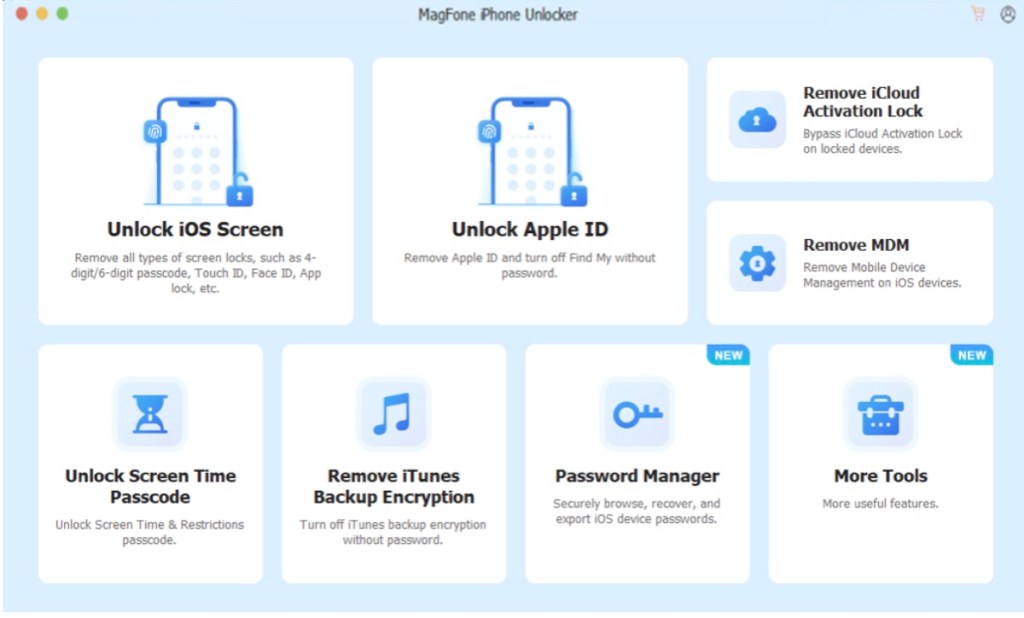
MagFone iPhone Unlocker is a desktop-based iOS unlocking program that provides several unlocking features, including iCloud Activation Lock removal. Its Activation Lock feature is designed for users who encounter the iPhone Locked to Owner screen after resetting a device. It also offers solutions for other common iPhone lock issues, such as unlock iPhone without passcode or Face ID, Apple ID removal, MDM restrictions, and Screen Time passcodes.
Key Features:
- Unlock iPhone screen passcodes.
- Remove supported Apple ID accounts.
- Address supported iPhone Locked to Owner situations.
- Bypass MDM restrictions.
- Remove Screen Time passcodes.
Pros:
- High success rate verified through testing
- Offers a straightforward desktop interface.
- Covers multiple types of iOS lock issues.
- Provide professional, customer-focused support with responsibility.
Cons:
- Activation Lock removal is limited to supported devices and iOS versions.
For users with a compatible device who also need other iPhone unlocking features, MagFone is a convenient option to consider.
How to Bypass iPhone Locked to Owner Using MagFone iPhone Unlocker
If you cannot access the original Apple Account or contact the previous owner, MagFone iPhone Unlocker offers another option for compatible devices. It provides a desktop-based solution for removing iCloud Activation Lock without entering the previously linked Apple Account. Here’s how to use it.
Step 1. Launch MagFone iPhone Unlocker
Run MagFone iPhone Unlocker on your computer. Open the program and select Remove iCloud Activation Lock.

Step 2. Connect Your iPhone
Use a USB cable to connect your locked iPhone to the computer. Click Start to continue.
Step 3. Enter DFU Mode
Follow the on-screen instructions to put your iPhone into DFU mode. MagFone will then begin the Activation Lock removal process automatically.

Step 4. Wait for the Process to Finish
Keep your iPhone connected while the software works. Once the process is complete, follow any remaining on-screen instructions.

#2. iMyFone LockWiper
iMyFone LockWiper’s official product page also advertises a solution for second-hand iPhones displaying the “iPhone Locked to Owner” message. However, this feature isn’t displayed on the product’s homepage. You’ll need to go to the Tool Box section to find it. Besides remove activation lock without previous owner, LockWiper provides tools for removing screen passcodes, Apple IDs, Screen Time restrictions, and MDM locks.


Pros:
- Offers multiple unlocking modes.
- Has a dedicated interface for different iOS lock issues.
- Provides official guides and compatibility information.
Cons:
- Not every Activation Lock situation is supported.
Its FAQ notes that certain Lost Mode or stolen-device Activation Lock cases may require iMyFone iBypasser instead. You should confirm the exact supported device and unlocking mode before purchasing. LockWiper is worth considering if you need a general-purpose iPhone unlocking tool. However, users dealing specifically with the Activation Lock screen should carefully check whether their device qualifies for the advertised feature.
#3. iRemove Tools
iRemove Tools focuses more specifically on iCloud Activation Lock bypass solutions. Unlike general-purpose iPhone unlockers, it offers different procedures based on the device’s processor, model, and iOS version.
Its official website lists support for older A7–A11 devices and selected newer A12–A15 models. The available method and limitations vary by device.
Key Features:
- Bypass supported iCloud Activation Lock screens.
- Support selected iPhone and iPad models.
- Offer different solutions for different processor generations.
- Check device compatibility before purchasing a license.
Pros:
- Focuses on Activation Lock-related problems.
- Covers a range of older and selected newer devices.
- Provides model-specific compatibility information.
Cons:
- The process and requirements vary considerably between devices.
- Some newer-device solutions are available only without cellular signal.
A successful bypass does not necessarily mean permanent removal of the original account association. For example, iRemove states that its A12-and-newer no-signal option cannot make outgoing cellular calls. Users should check the latest device-specific terms before ordering.
How to Choose an iPhone Locked to Owner Bypass Tool
Before paying for an iPhone unlocker, consider these points:
- Check device compatibility. Confirm your iPhone model and iOS version against the tool’s official specifications. Some solutions only work with older devices or particular processor generations.
- Understand the limitations. A bypass may affect cellular calls, iCloud services, software updates, or the ability to reactivate the device after a reset. Read the restrictions carefully.
- Try Apple’s official options first. If you know the linked Apple Account, enter the correct credentials or recover the account. If you bought a used iPhone, ask the previous owner to remove it from their account through iCloud Find Devices. If you have valid proof of purchase, you can also submit an Activation Lock support request to Apple.
- Use third-party tools only on devices you own or are authorized to unlock. They should not be treated as a way to claim ownership of a lost or stolen iPhone.
Article provided with permission from AppleWorld.Today