


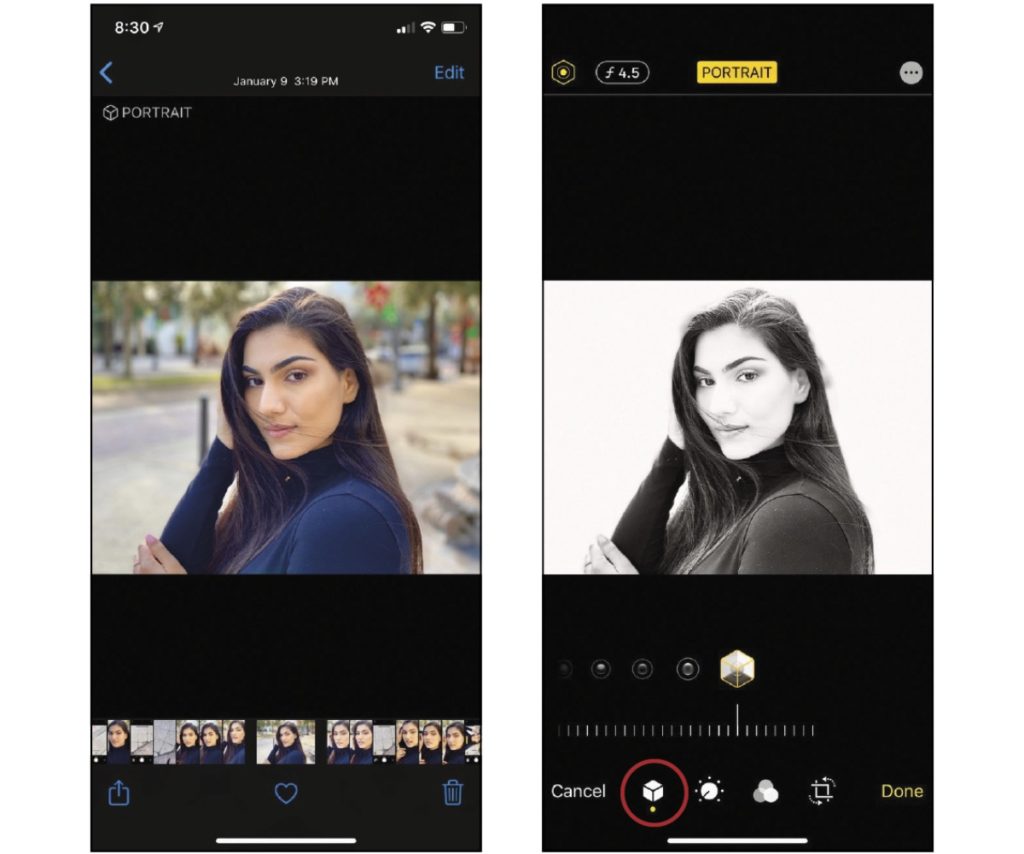
Photos in iOS 13 introduced a Portrait Lighting feature dubbed High-Key Mono, which uses depth mapping to simulate studio lighting and gives the sensation of either being closer or farther away from your subject. That feature conveniently continues in iOS 26.
To use the High-Key Mono effect on an iPhone running iOS 16, you’ll need to utilize the Portrait mode in the Camera app and select the High-Key Light Mono effect. This effect simulates a bright, grayscale portrait with a white background, creating a distinct look.
Taking a High-Key Mono Photo
- Open the Camera app on your iPhone.
- Swipe the mode selector to Portrait mode.
- Drag or swipe the lighting effects icons until you find High-Key Light Mono.
- Position your subject so the camera detects a face and the effect indicator turns yellow.
- Tap the Shutter button to take the black-and-white studio shot.
Editing an Existing Photo
- Open the Photos app and select your portrait picture.
- Tap Edit, then tap the Portrait Lighting icon (often a polygon or hexagon) at the top or bottom.
- Swipe through the options to select High-Key Light Mono.
Article provided with permission from AppleWorld.Today